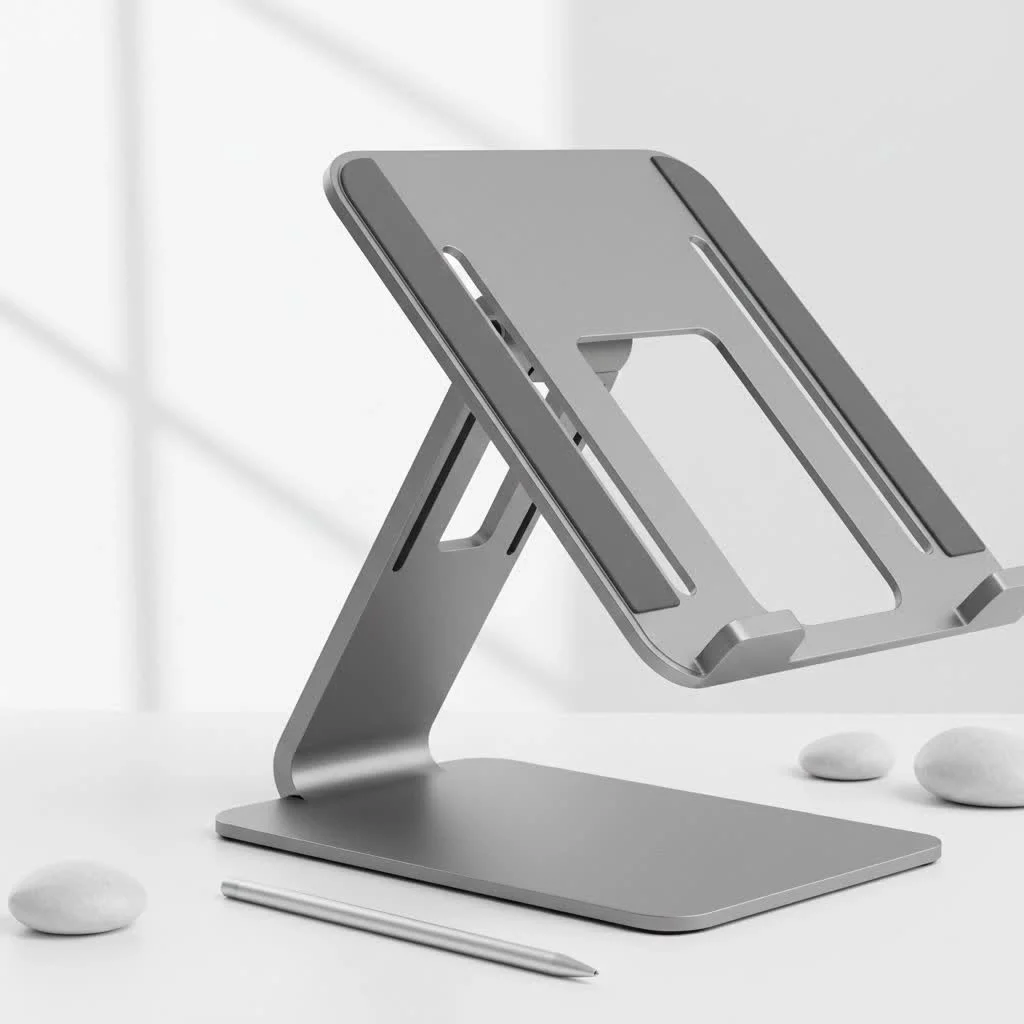
An adjustable laptop stand is a device that elevates and angles your laptop screen to eye level, preventing common issues like “tech neck” and improving overall ergonomics. This adaptability is crucial for preventing musculoskeletal issues associated with prolonged laptop use. By customizing height and tilt, users can create a perfectly ergonomic setup tailored to their body and desk, leading to better posture and increased productivity.
Why You Absolutely Need an Adjustable Laptop Stand
Investing in an adjustable laptop stand is more than just buying a desk accessory; it’s an investment in your health and work efficiency. The benefits are immediate and long-lasting, transforming the way you interact with your technology.
Boost Your Ergonomics and Banish Pain
The primary benefit of an adjustable stand is ergonomics. By raising your screen to eye level, you eliminate the need to hunch forward. This simple change aligns your spine, reduces strain on your neck and back muscles, and promotes a healthy posture. Over time, this can significantly alleviate chronic pain, prevent headaches, and reduce the risk of long-term spinal issues. A proper ergonomic setup ensures that your workday ends with a sense of accomplishment, not a list of aches and pains.
Enhance Productivity and Focus
When you’re not constantly shifting in your chair to find a comfortable position, you can dedicate more mental energy to your tasks. An ergonomic workspace, facilitated by an adjustable laptop stand, minimizes physical distractions, allowing for deeper concentration and improved focus. Better posture can increase oxygen flow and reduce fatigue, keeping you alert and productive throughout the day. It’s a simple change that can yield significant results in your work output.
Keep Your Laptop Cool and Efficient
Laptops generate a lot of heat, and poor ventilation can lead to throttling, where the device slows down to prevent overheating. Most adjustable laptop stands are designed with ventilation in mind. They lift the laptop off the desk surface, allowing for 360-degree airflow. Many models, especially those made from aluminum, also act as a heat sink, actively drawing heat away from your device. This keeps your laptop running at optimal performance and can even extend its lifespan.
What Are the Different Types of Adjustable Laptop Stands?
The market is filled with various designs, each catering to different needs. Understanding the main types will help you narrow down your search for the perfect adjustable laptop stand.
Z-Type Stands: The Versatile Powerhouses
As the name suggests, Z-type stands have a distinctive Z-shaped frame with multiple pivot points. This design offers an incredible range of height and angle adjustments, making it one of the most versatile options. You can easily set your laptop to the precise height for sitting or even create a makeshift standing desk setup. They are typically sturdy and made from aluminum, offering excellent stability.
C-Type Stands: The Stable Foundations
|
Our Picks for the Best Laptop Stand in 2026
As an Amazon Associate I earn from qualifying purchases.
|
||
| Num | Product | Action |
|---|---|---|
| 1 | Laptop Stand for Desk, Adjustable Laptop Riser ABS+Silicone Foldable Portable Notebook Holder, Ventilated Cooling Notebook Mount Computer Stand for 10-15.6” Laptops,Tablets-Black |

|
| 2 | OMOTON 360° Rotating Laptop Stand Riser for Desk, Ergonomic Foldable Computer Stand Adjustable Height Angles for Collaborative Work, Easy Storage Fit Macbooks,All Laptops up to 16 inches, Silver |
|
| 3 | BESIGN LS03 Aluminum Laptop Stand, Ergonomic Detachable Computer Stand, Notebook Riser Compatible with Air, Pro, Dell, HP, Lenovo More 10-15.6\" Laptops, Silver |
|
| 4 | Adjustable Laptop Stand for Desk, Metal Foldable Laptop Riser Holder, Portable Desktop Book Stands, Ventilated Cooling Computer Notebook Stand Compatible with 10-15.6” Laptops |
|
| 5 | BESIGN LS03 Aluminum Laptop Stand, Ergonomic Detachable Computer Stand, Riser Holder Notebook Stand Compatible with Air, Pro, Dell, HP, Lenovo More 10-15.6\" Laptops, Black |
|
| 6 | Amazon Basics Sturdy and Portable Ergonomic Laptop Stand for Desk, Height Adjustable Riser with Ventilated Cooling, Foldable, Fits all Laptops up to 17.3 Inch, Silver, 10 x 8.7 x 6 in |
|
| 7 | tounee Telescopic Laptop Stand for Desk with 360° Swivel Base, Sit to Stand, Height Adjustable, Portable Riser Holder for Good Posture, Compatible with MacBook Pro, All Laptops 10-17\"-Gray |
|
| 8 | Adjustable Laptop Stand, Computer Stand with 360 Rotating Base, Ergonomic Laptop Riser Mount for Desk Foldable Protable Computer Desk Fits with MacBook Pro Air (10-16\") - Black |
|
| 9 | acer Laptop Stand for Desk - with 360 Swivel Base, Rotating Laptop Riser for Desk, Adjustable Computer Stand for Laptops, Ergonomic Riser Holder Foldable, Portable MacBook Pro Air (10-16\") - Silver |
|
| 10 | Lamicall Adjustable Laptop Stand, Portable Laptop Riser, Aluminum Laptop Stand for Desk Foldable, Ergonomic Computer Notebook Stand Holder for MacBook Air Pro, Dell XPS, HP (10-17.3\'\') - Silver |
|
C-type stands have a simpler, more rigid C-shaped structure. While their adjustability is often more limited compared to Z-type models—usually involving a few preset height slots—they provide a rock-solid, stable base for your laptop. They are a great, no-fuss option for users who have found their ideal ergonomic height and don’t need to change it frequently.
Portable Stands: Your On-the-Go Companion
For digital nomads, students, or anyone who frequently works from different locations, a portable adjustable laptop stand is essential. These stands are incredibly lightweight and fold down into a compact shape that can easily fit into a backpack or laptop bag. While they might not offer the same height range as larger models, they provide a crucial ergonomic lift wherever you go.
Standing Desk Converters: The Ultimate Upgrade
These are larger, more robust platforms that sit on top of your existing desk. They can hold a laptop, an external keyboard, and a mouse, and they adjust to allow you to switch between sitting and standing seamlessly. While they are the most expensive option, they offer the full health benefits of a standing desk without needing to replace your furniture.
How to Choose the Perfect Adjustable Laptop Stand for You
With so many options, selecting the right stand can feel overwhelming. Focus on these key factors to make an informed decision that suits your specific needs.
What size and weight should I look for?
First and foremost, ensure the stand is compatible with your laptop’s size and weight. Most stands list a supported size range (e.g., 10-17 inches) and a maximum weight capacity. A stand that is too small or flimsy for your device will be unstable and unsafe. Always check the manufacturer’s specifications to guarantee a secure fit for your specific laptop model.
Does the material of the stand matter?
Yes, the material significantly impacts stability, durability, and heat dissipation.
- Aluminum: This is the most popular choice for a reason. It’s strong, lightweight, and an excellent heat conductor, which helps keep your laptop cool. It also offers a premium, modern aesthetic.
- Plastic: High-quality ABS plastic stands can be very durable and are often more affordable. However, they lack the heat-dissipating properties of metal.
- Wood/Bamboo: These stands offer a unique, natural look but may offer less adjustability and can be heavier.
“An aluminum stand not only provides superior stability but also passively cools your device,” notes ergonomics specialist Dr. Adrian Vance. “This dual function is a key reason I recommend it for anyone spending long hours on their laptop.”
How much adjustability do I need?
Consider your workspace and habits. Do you need to fine-tune the height and angle frequently? If so, a Z-type stand with smooth, flexible joints is your best bet. If you primarily work from one desk and just need to improve your screen, a simpler model with a few height settings might be sufficient. For those wanting to alternate between sitting and standing, a converter with a wide height range is necessary.
Will I be traveling with it?
Portability is a crucial factor for many users. If you plan to carry your stand between home, the office, or a coffee shop, look for one that is lightweight and folds down compactly. Many portable models come with a carrying pouch for added convenience. For a purely stationary setup, you can prioritize stability and size over portability.
Frequently Asked Questions (FAQ)
What is the ideal height for a laptop stand?
The ideal height is one that places the top of your screen at or just below your eye level. Your eyes should naturally gaze at the top third of the monitor. This prevents you from tilting your head up or down, keeping your neck in a neutral, relaxed position.
Can an adjustable laptop stand damage my laptop?
No, a well-designed stand will not damage your laptop. On the contrary, it helps by improving airflow and preventing overheating. Ensure the stand you choose has rubber or silicone pads on its surface and hooks to prevent your laptop from scratching or sliding off.
Are plastic stands as good as metal ones?
While high-grade plastic stands can be very functional and durable, metal (specifically aluminum) stands are generally considered superior. They offer better stability, a more premium feel, and the significant advantage of acting as a heat sink to cool your laptop.
How do I clean my laptop stand?
Cleaning is simple. For metal or plastic stands, just wipe them down with a damp cloth. You can use a mild cleaning solution if needed, but avoid harsh chemicals. For wooden stands, use a dry or slightly damp cloth and avoid excess moisture.
Can I use a laptop stand with a second monitor?
Absolutely! Using an adjustable laptop stand is a perfect way to integrate your laptop into a dual-monitor setup. You can adjust the laptop screen to match the height of your external monitor, creating a seamless and expansive display that is ergonomically sound.
Your Next Step to a Healthier Workspace
Switching to an adjustable laptop stand is one of the most impactful and cost-effective upgrades you can make for your workspace. It’s a simple tool that addresses complex problems, from chronic pain and poor posture to device performance and productivity. By choosing a stand that fits your laptop, your workspace, and your lifestyle, you are taking a definitive step toward a healthier, more comfortable, and more efficient work life. Explore your options, make the change, and feel the difference for yourself.
Frequently Asked Questions
What is the ideal height for an adjustable laptop stand?
The ideal height for a laptop stand positions the top of your screen at or just below your eye level. This ensures your eyes naturally gaze at the top third of the monitor, maintaining a neutral and relaxed neck position to prevent strain.
Can using an adjustable laptop stand cause damage to my laptop?
No, a well-designed adjustable laptop stand will not damage your laptop. In fact, it helps by improving airflow and preventing overheating, which can extend your device's lifespan. Always choose a stand with rubber or silicone pads to prevent scratches and ensure stability.
Are plastic laptop stands as effective as metal ones for ergonomics?
While high-grade plastic stands can be functional and durable, metal stands, particularly those made from aluminum, are generally superior. Aluminum offers better stability, a more premium feel, and significantly aids in cooling your laptop by acting as a heat sink.
How should I clean my adjustable laptop stand to maintain it?
Cleaning your laptop stand is simple. For metal or plastic stands, wipe them down with a damp cloth, using a mild cleaning solution if necessary, but avoid harsh chemicals. For wooden stands, use a dry or slightly damp cloth and prevent excess moisture.
Is it possible to use a laptop stand with a dual-monitor setup?
Yes, an adjustable laptop stand is an excellent tool for integrating your laptop into a dual-monitor setup. You can easily adjust the laptop screen's height to match your external monitor, creating a seamless and ergonomically sound expansive display.
How to Choose the Perfect Adjustable Laptop Stand
Selecting the right adjustable laptop stand involves considering several key factors to ensure it meets your ergonomic and functional needs.
Ensure the stand supports your laptop's size, typically ranging from 10-17 inches, and its maximum weight capacity. An incompatible stand can be unstable and unsafe for your device.
Consider materials like aluminum for superior stability, lightweight design, and excellent heat dissipation. Plastic offers affordability but lacks cooling properties, while wood provides a unique aesthetic but may be heavier.
Assess your workspace habits: if you frequently change height and angle, a Z-type stand with flexible joints is ideal. For a stationary setup, a simpler model with fewer height settings may suffice, or a standing desk converter for sit-stand versatility.
If you plan to travel with your stand, prioritize lightweight and compact folding designs. Many portable models include a carrying pouch for convenience, whereas stationary setups can prioritize stability over portability.
Get our weekly buyer guide
Practical specs, not advice. Unsubscribe anytime.
I’ve been using an adjustable laptop stand for a few weeks now, and it’s made a huge difference. My neck pain from looking down at my laptop all day is practically gone. I love how easy it is to customize the height and tilt to get it just right for my standing desk setup. Definitely a game-changer for my posture and overall comfort.
The stand does a good job of elevating my laptop to eye level, which has helped with my ‘tech neck’ issues. However, I found that for my heavier 17-inch laptop, it’s a little less stable at its maximum height. It still works, but I have to be careful not to bump my desk too much. Good for the price range, but wish it was a bit sturdier.
I was skeptical about how much an adjustable laptop stand could really improve my work efficiency, but I’m a convert. Being able to set my screen at the perfect ergonomic height has made long coding sessions so much more comfortable. It’s a simple accessory that delivers on its promise of better posture and increased productivity.
This stand is exactly what I needed! I used to slouch so much, and now my screen is at eye level, which has completely transformed my workspace. It’s super easy to adjust, and I can switch between sitting and standing without any hassle. Highly recommend for anyone looking to banish pain and improve their setup.